
When it comes to working with AI, the old saying “garbage in, garbage out” couldn’t be more accurate. If you’re not crystal clear in your requests, don’t be surprised when the results miss the mark. That’s where using structured tags improve AI responses and can in your prompts can make a difference. By organizing your instructions into simple, easy-to-follow sections—like defining the tone, task, and audience—you’re essentially giving AI a blueprint to work from. The best part? This isn’t some overly technical hack. It’s a straightforward way to get better responses, save time, and, frankly, stop pulling your hair out when the AI just doesn’t “get it.” Let me show you how this works.
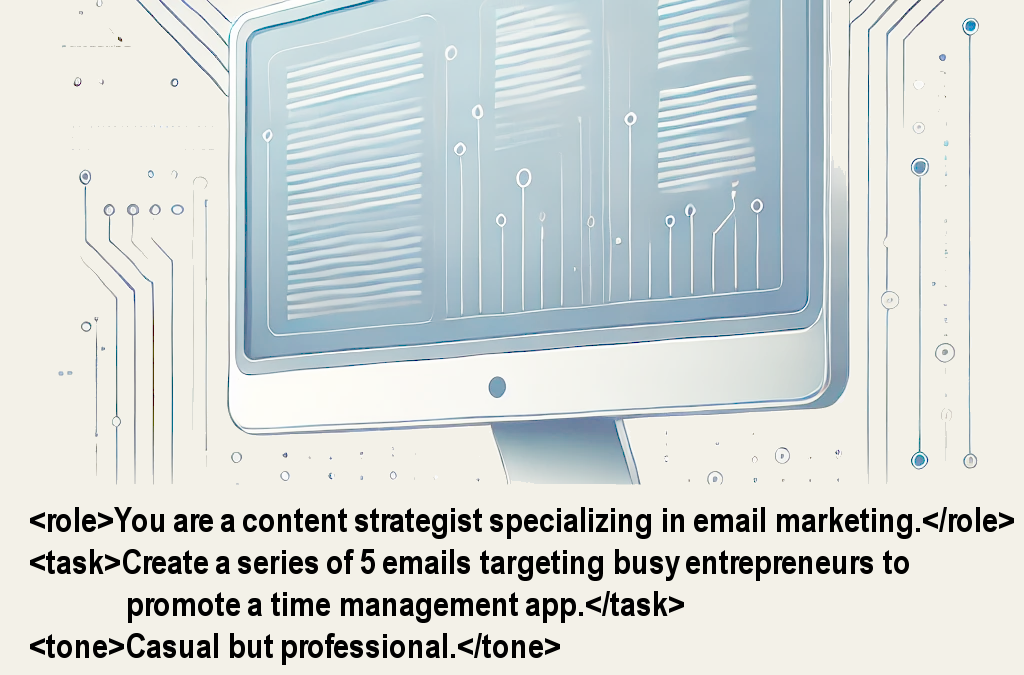
Using structured tags like <role>, <task>, <tone>, and <note> can make a prompt clearer and more likely to produce the desired output because it organizes the request and provides unambiguous context. While the tags themselves don’t activate specific behavior in most AI models, their structured use can significantly enhance the likelihood of getting a precise and relevant response.
Why This Approach Works
- Clarity: Structured tags break down the request into distinct parts, making it easier for the AI to focus on each aspect.
- Focus: By explicitly stating the role, task, tone, and other elements, the AI can “understand” the request better.
- Flexibility: Tags allow you to easily modify or expand the prompt without rephrasing the entire request.
Recommended Tags for Prompts
Here are some of the most effective tags you could use based on common use cases:
General Tags
<role>: Defines the perspective or expertise you want the AI to adopt.- Example:
<role>You are a legal advisor specializing in contracts.</role>
- Example:
<task>: Specifies what the AI should do.- Example:
<task>Write a summary of the attached text in 200 words.</task>
- Example:
<tone>: Sets the style or tone of the output.- Example:
<tone>Professional but approachable.</tone>
- Example:
<audience>: Identifies the target audience for the response.- Example:
<audience>Small business owners unfamiliar with marketing jargon.</audience>
- Example:
<format>: Indicates the format of the response.- Example:
<format>A numbered list of steps.</format>
- Example:
<note>: Provides additional instructions or constraints.- Example:
<note>Keep the explanation under 150 words and avoid technical terms.</note>
- Example:
Context-Specific Tags
For more tailored prompts, you might add these:
<goal>: Explains the outcome or purpose.- Example:
<goal>Encourage sign-ups for our free webinar.</goal>
- Example:
<data>: Provides specific inputs or context for the task.- Example:
<data>Our target demographic is women aged 25-40 interested in wellness.</data>
- Example:
<constraints>: Highlights limitations or rules.- Example:
<constraints>Do not exceed 3 paragraphs and avoid the use of slang.</constraints>
- Example:
<style>: Requests specific stylistic approaches (e.g., first-person, humor).- Example:
<style>Use a conversational tone with a touch of humor.</style>
- Example:
For Creative or Analytical Tasks
<examples>: Offers examples of what you’re looking for.- Example:
<examples>Refer to the tone of these ads: [insert examples].</examples>
- Example:
<analysis>: Requests deeper insights.- Example:
<analysis>Evaluate the effectiveness of this marketing strategy.</analysis>
- Example:
Of course you can make up your own tags, because as I said, the tags themselves are not defined or used specifically by the AI model, they are simply there to provide clarity. So if you want to use a tag called <caption> or <strategy> or whatever, feel free to do so.
How to Use Them Effectively
Here’s a sample prompt with multiple tags:
Comparison
Here was the result of the first email ChatGPT suggested:
Email 1: Introduction to the App
Subject: Meet Your New Personal Time Assistant 🕒
Body: Hello [Name],
As an entrepreneur, your time is your most valuable asset. That’s why we created [App Name] — to help you seize every minute with ease. Our app doesn’t just manage your schedule; it optimizes it so you can focus on what really matters.
Why not take the first step towards better time management today?
Call to Action: Try [App Name] for Free!
Next I tried the prompt as in the example about using tags. Here is the result.
Email 1: The Introduction
Subject Line: “Overworked? Meet Your New Secret Weapon.”
Body:
Hey [First Name],
Let’s be real: balancing your business, personal life, and everything else feels like juggling flaming swords some days. The good news? It doesn’t have to be that way.
Our app was made for entrepreneurs like you—people with big dreams and not enough hours in the day. It’s not just a planner; it’s your new partner in productivity.
Imagine:
- Never forgetting a meeting.
- Getting clear priorities every day.
- Carving out guilt-free time for your family (or yourself!).
Sound like what you need? Take the first step today.
CTA: Get Started Free
Result
Why This is More Effective
- Clarity: The tags segment the task into digestible pieces for the AI.
- Focus: Each tag answers a key question: Who, What, How, For Whom, and Why.
- Consistency: The tags ensure all relevant details are included without redundancy.
By using structured tags in your prompts, you’re essentially giving a detailed blueprint for the AI to follow. This increases the likelihood of getting the exact response you’re looking for.
Getting the most out of AI doesn’t require a PhD or hours of trial and error. It’s about being intentional with your prompts and using tools like structured tags to set clear expectations. Think of it like giving directions—if you’re vague, the results will be all over the place, but when you’re precise, the AI delivers exactly what you need. So, the next time you sit down to craft a prompt, take an extra minute to break it into roles, tasks, tones, and other key details. You’ll be amazed at how much smoother your AI interactions become. And who doesn’t want to spend less time fixing mistakes and more time getting results? Give it a try and let me know how it works for you!








 Guest Posting

