

Imagine this: someone fills out the contact form on your website asking about your services. Five minutes later, they’ve received a personalized email that sounds like you wrote it. Their information is logged in your CRM. Your calendar has penciled them in for a discovery call next week. And you didn’t lift a finger.
Most people would call that automation. And sure, it is. But it’s also something more. That scenario didn’t just follow a script—it made decisions. It understood intent. It adapted.
This is what AI agents for small business are built to do. Not just automate a task, but manage an outcome—handling the kind of behind-the-scenes work that normally eats up your day.
Welcome to the world of AI agents.
But First: What You Need to Know About LLMs
Before we dive deeper, let’s clarify what makes all this possible: large language models (LLMs). Tools like ChatGPT, Claude, and Gemini are trained on massive datasets to understand and generate language. But when it comes to your business, there are two critical limitations:
They don’t know your business.
Even though they’ve been trained on a massive amount of public data, they’re flying blind when it comes to your internal documents, proprietary processes, or customer history—unless you feed that in through connected tools like RAG (we’ll get to that in a second).They’re reactive, not proactive.
Out of the box, LLMs sit and wait for a prompt. They’re not going to take initiative or perform ongoing tasks unless you build a system around them.
This is where workflows and agents come in. They give LLMs arms and legs. Instead of being a really smart notepad, you get a digital team member who can actually do something useful.
Let’s Talk About Workflows
If you’ve ever set up an email autoresponder, you’ve created a workflow. Same thing if you’ve connected your calendar to a scheduling tool or zapped information from one app to another.
Workflows are the assembly lines of your business. Something triggers the start—maybe a form submission—and the system follows your instructions step by step. It’s consistent. It’s efficient. And most small business owners haven’t scratched the surface of what these tools can do.
Platforms like Make.com and Zapier are built for this. You can string together tasks, link your apps, and automate the repetitive stuff that bogs you down.
But now, the next evolution is happening.
What Makes an AI Agent Different?
A workflow runs the steps you’ve already figured out.
An AI agent, on the other hand, figures out the steps for you.
Think of it this way: a workflow is like writing a recipe and expecting the system to follow it exactly. An AI agent is more like hiring a personal chef. You tell them what kind of meal you want, and they decide what ingredients to use, how to prepare it, and when to serve it.
That’s the shift. You’re no longer limited to just automating what you already know. You can now delegate the entire task—based on goals, not just instructions.
Real-World Examples
Let’s go back to that contact form example.
With a workflow, it might:
Add the lead to your CRM
Send a canned reply
Ping you in Slack
Useful, but it’s just executing pre-written steps.
With an AI agent, it could:
Understand the person is asking about coaching packages
Check your availability
Write a custom response based on your tone and offer
Send a calendar link
Log it with a personalized note in your CRM
That’s not just automation. That’s assistance.
What About RAG? (It’s Not as Nerdy as It Sounds)
RAG stands for Retrieval-Augmented Generation. It lets your AI assistant “look up” information before it answers a question—like consulting your internal knowledge base.
Let’s say someone asks, “What’s your refund policy?”
With RAG, your assistant checks your actual documents and gives the real answer—not something it guessed from generic training.
It’s like giving your agent access to the employee handbook. And it’s a game-changer for keeping information accurate without retraining or rewriting prompts.
Where Workflows Still Shine
Agents don’t replace workflows—they often rely on them.
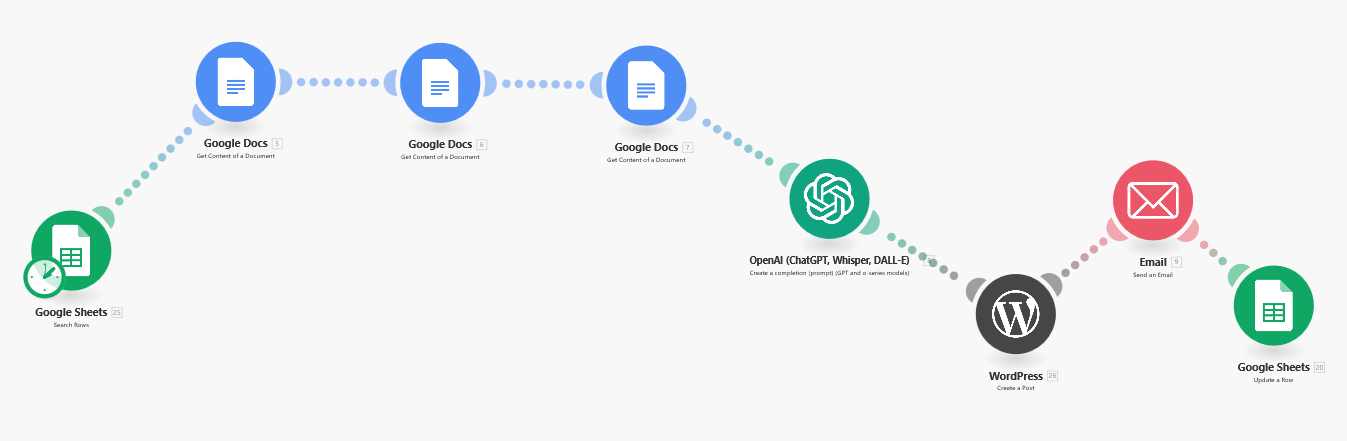
Take Make.com, for example. It’s a visual workflow tool that now supports AI through integration with OpenAI. You can:
Pull content from a Google Doc
Dynamically update a prompt
Generate a blog post or email
Schedule it to run automatically every Monday at 9am
So you’re not just automating repetitive tasks—you’re automating creativity. That’s powerful.
Here is an example of what a Make workflow looks like:
Between Visual Flow and Agents: How Wordware Bridges the Gap
If you’re not into drawing arrows or building flowcharts but want more control than what AI chatbots give you, check out Wordware.
It lets you describe what your agent should do, and it builds logic behind the scenes. You can add memory, branching behavior, and even RAG—all without touching code.
Instead of dragging and dropping, you write:
“If the form mentions a refund, pull the refund policy and respond. Otherwise, forward to support.”
And just like that, you’ve got a deployable app.
Wordware is ideal for those who like to work in structured documents like Notion and want a little more logic and control without the dev headache.
Relay.app: Visual Workflows With a Brain
At first glance, Relay.app looks like another drag-and-drop tool. But here’s the twist: it supports Mini AI Agents inside your workflows.
Let’s say a new lead fills out a form. Relay’s built-in agent can read the message, determine if it’s a sales or support inquiry, and route accordingly.
It’s automation, but with real decision-making. You can build in human approvals, define conditions, and let the system figure things out without hardcoding every scenario.
For business owners who want smarter automation without technical overhead, Relay.app is worth exploring.
ChatGPT Agent Mode: Powerful, But Not Fully Autonomous
OpenAI now lets you create your own digital assistants using ChatGPT’s Agent Mode. You can train these agents with your data, give them memory, define tools, and teach them how to help you.
But here’s the catch: it’s still prompt-based. You need to interact with it directly—it doesn’t run in the background or trigger automatically.
It’s great for high-touch conversations, deep research, or advanced help desk bots. But don’t expect it to post your blog for you every Monday. Not yet.
Marblism: Goal-Based Agents
Marblism is a different beast. You don’t build workflows at all. You give it a goal—like “grow my email list” or “handle refunds”—and it decides how to make that happen.
It uses modular tasks (called “marbles”) and adjusts behavior based on what works. It even adapts over time and remembers context.
If you want to assign outcomes without building the steps yourself, Marblism is a great fit.
What About Voice Agents?
Voice agents are another area gaining traction—these are AI assistants you can talk to, and in some cases, they talk back. Think smart speakers like Alexa or voice-powered customer support lines, powered by tools like ElevenLabs or D-ID.
You can now build sales reps, coaches, or content guides that sound like you, using platforms like SalesCloser.ai.
SalesCloser agents run full conversations with leads. They answer questions, overcome objections, qualify prospects, and book meetings—all by voice.
If you’re a content creator, coach, or consultant who values connection but hates the calendar drain, this is a real opportunity.
Agent Builder Comparison Table
| Platform | Best For | Skill Level | Agent Autonomy | Use Cases | Shareability | RAG Support | Browser Actions | Trigger Capable | Notes |
|---|---|---|---|---|---|---|---|---|---|
| MindPal | Non-tech users | No-code | ✅ High | Lead follow-up, Content, Service bots | ✅ Easy share/embed | ✅ Yes | ❌ No | ⚠️ External triggers | Great for client-facing agents |
| Make.com | Creative automation | Low to medium | ⚠️ Limited | Blog writing, prompt chaining, social media | ✅ Share scenarios | ✅ Yes | ❌ No | ✅ Yes | Workflows + AI = strong combo |
| Wordware | Logic-heavy tasks | Medium | ✅ Medium | Form handling, doc lookups | ⚠️ Shareable apps | ✅ Yes | ❌ No | ⚠️ Manual run | Text-based workflow builder |
| Relay.app | Smart workflows | Low | ⚠️ Medium | Message routing, AI decisions | ⚠️ Limited | ⚠️ Experimental | ❌ No | ✅ Yes | AI inside visual flows |
| ChatGPT Agents | Power users/devs | High | ⚠️ Prompt-based | Personal assistants, AI tools | ⚠️ Limited | ✅ Yes | ✅ Yes (API) | ❌ No | Not auto-triggered |
| Marblism | Goal delegation | No-code | ✅ Very High | Email growth, support, marketing | ⚠️ Platform-controlled | ✅ Yes | ✅ Yes | ⚠️ Abstract triggers | Outcome-based AI |
| SalesCloser.ai | Voice sales agents | None | ✅ High | Sales calls, lead qualification | ⚠️ Proprietary | ❌ Not standard RAG | ✅ Yes (voice UI) | ✅ Calls triggered by scheduling | Voice-first automation |
Final Thoughts
Most small business owners haven’t even scratched the surface of what these tools can do.
Here’s the key takeaway:
Workflows automate what you’ve already figured out
AI agents help you delegate outcomes
You can and should use both
Whether you’re trying to streamline content, scale support, or personalize your outreach, there’s an agent—or a workflow—that can multiply your impact.
Ready to Build Your First Agent?
If you’re curious what this could look like in your business—but you’re not sure where to start—let’s chat. I’ll walk you through exactly how to design your own AI-powered assistant using tools like Make.com, MindPal, or Marblism.
We’ll keep it simple. We’ll make it useful. And most importantly, we’ll make it work for you.
Schedule a quick strategy call and let’s explore what’s possible.
This isn’t about replacing people. It’s about multiplying your impact.








 Guest Posting

