VideoGen and InVideo AI are at the forefront of the video creation landscape, each bringing unique strengths to the table. VideoGen is your go-to for speedy, efficient video production, perfect for those who need quality content fast without getting bogged down by complexities. On the flip side, InVideo AI offers a treasure trove of editing tools and an expansive template library, making it ideal for creators seeking depth and flexibility in their projects.
Let’s dive into what makes VideoGen a standout. This AI-powered tool is revolutionizing the way we create professional videos. Imagine being able to whip up top-notch content in seconds—VideoGen makes it possible. With a vast library of over 3 million assets and support for more than 40 languages, this platform handles everything from quick promos to educational courses with ease.
Using VideoGen is a breeze:
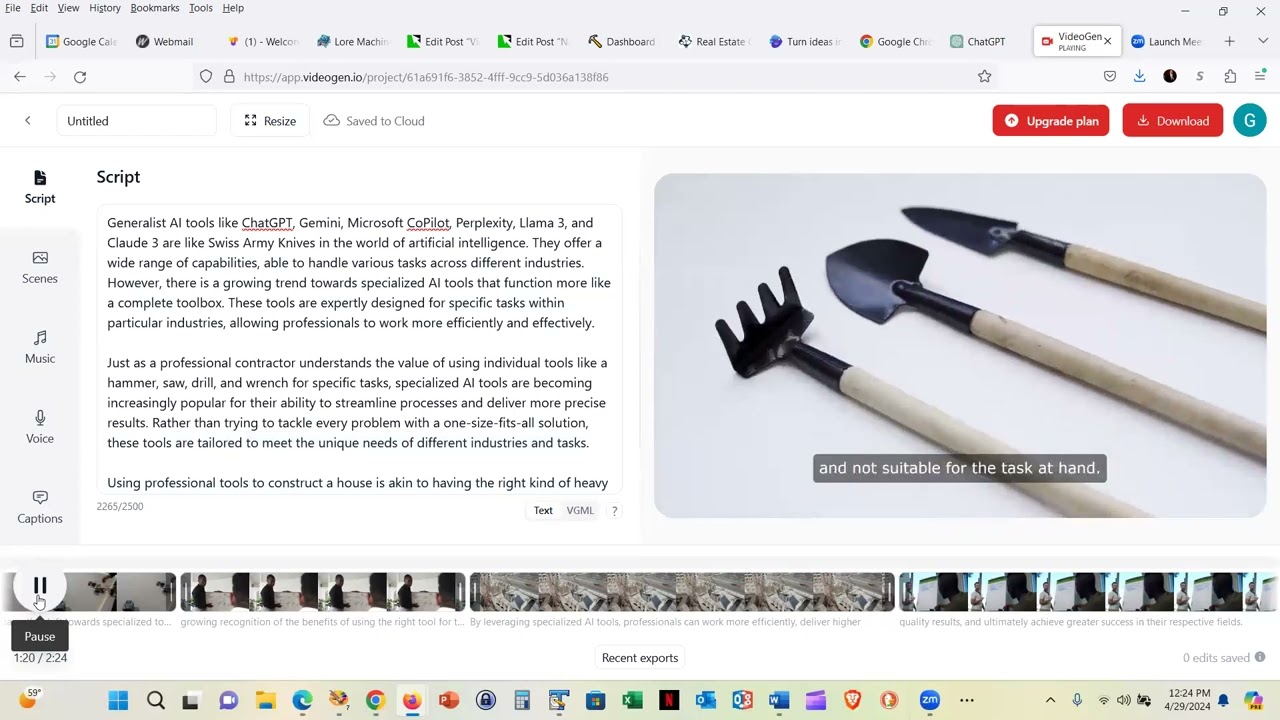
- Start with a Script: Whether you write it or let VideoGen’s AI craft it, you begin here. You can either prompt VideoGen to create a script, or specify a website URL and it will grab the information from there.
- Pick Your Visuals: Explore the extensive library or let the AI select based on your script.
- Choose Your Narrator: Opt from a variety of voices and accents.
- Editing Time: Make your tweaks in the user-friendly browser-based editor. You can completely over-write the generated script by pasting in your own if you prefer.
- Export: Download your video in the preferred format, and you’re all set.
Obviously, if you want to remove water marks and download the videos in HD, you must upgrade, but here is an idea of what VideoGen can produce (in just a few minutes).
Switching gears to InVideo AI, this platform transforms the video-making process with its dynamic, AI-driven capabilities. It’s akin to having a high-end video editing suite at your disposal—minus the complexity. This tool is designed to craft engaging videos down to the finest detail in minutes, ideal for those who value creative control and customization.
Getting started with InVideo AI is straightforward:
- Start with Your Idea: Input your concept or use the AI to generate a script.
- Choose Your Template: Select from thousands that match your video’s style and tone.
- Customize Your Content: Add personal touches with music tracks, voiceovers, and advanced edits.
- Review and Edit: Adjust your video to ensure it meets your standards.
- Export and Share: Once you’re happy, export your video in the desired format and share it across your platforms.
InVideo AI is particularly adept at elevating your video production, making it an invaluable tool for digital marketers, educators, and content creators seeking to make an impact.
Here is an example created with InVideo. Again you must upgrade to download without the watermarks, but being able to produce a video like this in minutes makes it worthwhile.
Now, let’s compare these tools with others like Synthesia, Fliki, D-id, and Deepbrain AI Studios:
- Synthesia specializes in AI avatars, great for when you need a digital spokesperson.
- Fliki excels at turning text from blogs or tweets into educational videos.
- D-id and Deepbrain AI Studios are known for their photorealistic talking heads, adding a personal touch to videos.
When placed alongside VideoGen and InVideo AI, each tool has its merits, but the choice depends on your specific needs:









 Guest Posting

